The Auto Attend feature in Ticked Off is designed to streamline the process of updating work request statuses. With this feature, requests can automatically move from "Open" to "Awaiting Supplier Review" based on your confirmed attendance via QR sign-in.
Step 1: Signing In On-Site
Scan the QR Code: When you arrive on-site, use the Ticked Off app to scan the provided QR code. This confirms your presence at the location.
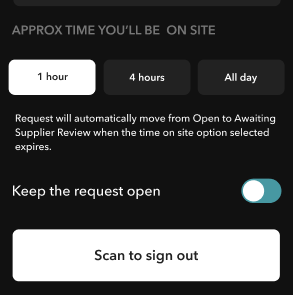
Select Your Time: Choose how long you expect to be on-site. Options typically include 1 hour, 4 hours, or all day.
Step 2: Automatic Status Update
Auto Update: Once the selected time expires, Ticked Off automatically moves the request from "Open" to "Awaiting Supplier Review." This saves you the step of manually updating the request status.
Step 3: Manual Control (Optional)
Keep the Request Open: If you need to keep the request open for any reason, toggle the "Keep the request open" option on the app before your time expires. This allows you to manually manage the request status later.
Sign Out Manually: If you finish the job early, you can manually sign out by scanning the QR code again.
Step 4: Completing the Supplier Review
Add Completion Details: After the request has moved to "Awaiting Supplier Review," you can add any necessary details, including costs, completion photos, and additional notes.
Mark as Complete: Finalize the request by completing the supplier review in Ticked Off.
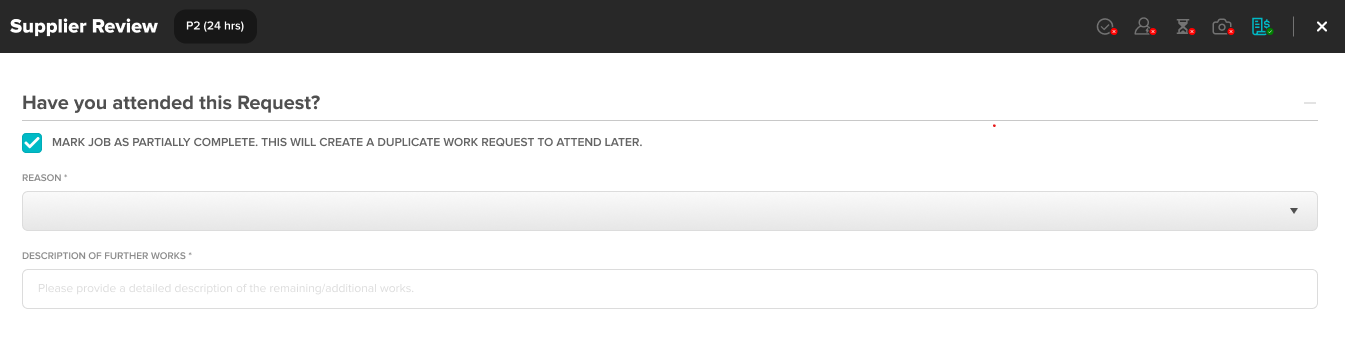
Mark as Partially Complete: The partially complete function is now available via the supplier review popup.
Benefits of Auto Attend
- Efficiency: Automatically updating the request status reduces manual work and keeps the process moving smoothly.
- Fast Payments: Using the Auto Attend function helps you meet criteria for the Fast Payment scheme, ensuring timely payment processing (Ticked Off managed suppliers only).
Need Help?
If you have any questions or run into any issues, feel free to reach out. We're here to help you make the most of Ticked Off.
Was this article helpful?
That’s Great!
Thank you for your feedback
Sorry! We couldn't be helpful
Thank you for your feedback
Feedback sent
We appreciate your effort and will try to fix the article