Users with correct permissions are able to complete checklists via the web platform or mobile app. These could be ad-hoc, or on a programmed basis via a request.
Submitting an ad-hoc checklist - Web
Via the checklist tab, click New Checklist in the top right hand corner of screen and select the checklist you want to complete.

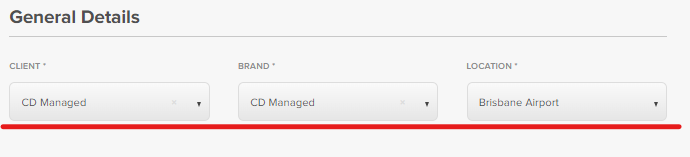
Select Client, Brand and Location you are completing the Checklist for.
Answer all questions and provide photos/documents where asked.
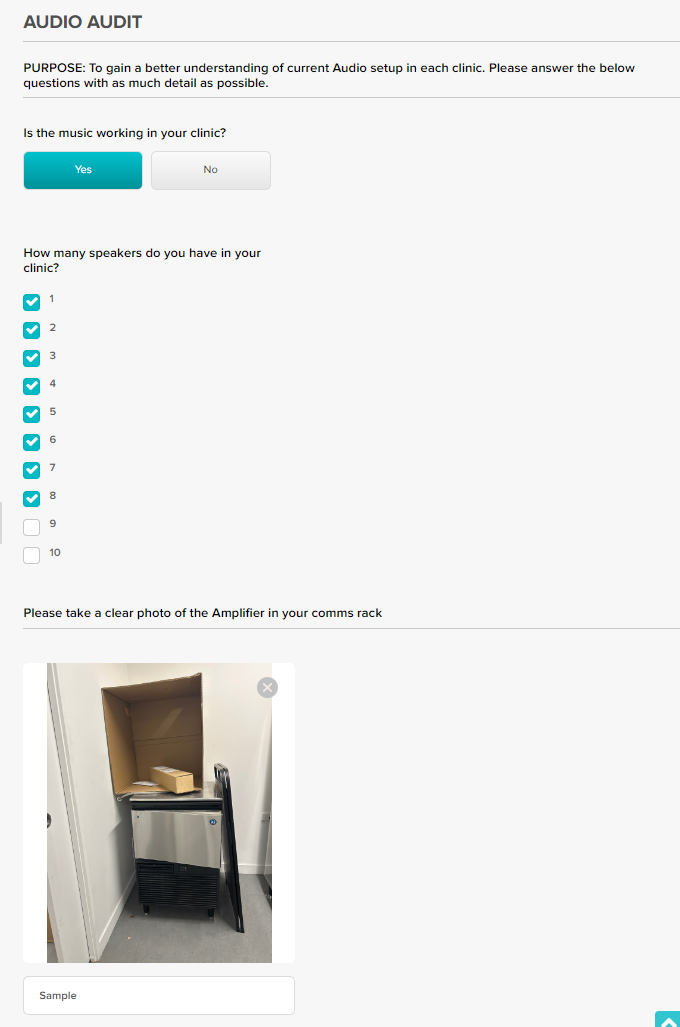
Some questions may be mandatory, you will be advised if a mandatory question has been missed.

When all answers have been provided, click Submit.
Checklist has now been submitted and able to be reviewed and or shared as required.

If you would like to save your progress to resume at a later time, click Save In Draft. Request will be saved as In Progress. You can resume via the 3 dots to the right.

NOTE: Checklists that have been issued via a WR will also be in the In Progress status until they have been submitted be listed.
To cancel checklist submission click Cancel. All progress will be lost.
Submitting an ad-hoc checklist - App
Via the checklist tab, click the Plus Symbol in the top right hand corner of screen and select the checklist you want to complete.
Select Client, Brand and Location you are completing the Checklist for.
Answer all questions and provide photos/documents where asked. Clicking Items with a > symbol will display the available answers for that question.
Some questions may be mandatory, you will be advised if a mandatory question has been missed.
When all answers have been provided, click Submit.
Checklist has now been submitted and able to be reviewed and or shared as required.
If you would like to save your progress to resume at a later time, click Save In Draft. Request will be saved as In Progress. You can resume via the 3 dots to the right.
Was this article helpful?
That’s Great!
Thank you for your feedback
Sorry! We couldn't be helpful
Thank you for your feedback
Feedback sent
We appreciate your effort and will try to fix the article